
For many Nepali investors, the first real step into the share market is an IPO application on Meroshare. It is also where a lot of confusion starts: which issues are open, who is eligible, how many units to apply for, and where to check the result. StockYatra's IPO tracker brings the details together in one place, and this guide walks you through applying on Meroshare, step by step.
In short
- StockYatra's IPO tracker lists Nepal primary-market issues: IPOs, FPOs, right shares, debentures, mutual funds and auctions.
- Each issue shows its status (upcoming, open, closing soon, closed, allotment, listed), key dates, units, price and eligibility.
- You apply on Meroshare through ASBA, never through StockYatra. StockYatra takes no applications or money.
- After allotment, check your result in Meroshare or on the CDSC IPO result site.
What the IPO tracker shows
Open IPO Calendar from the StockYatra menu (it is also on the StockYatra website and the web trade terminal). Each issue card shows:
- Type: IPO, FPO, right share, debenture, mutual fund or auction.
- Company, symbol and sector, plus the credit rating where one is published.
- Units on offer, price per unit and the minimum and maximum you can apply for (the minimum is usually 10 units).
- Eligibility: general public, project-affected locals, Nepalis in foreign employment, staff, or existing shareholders for right shares.
- Issue manager and dates: opening, closing, any extension, allotment and listing.
- Prospectus link, highlights and a short summary.
Statuses, from upcoming to listed
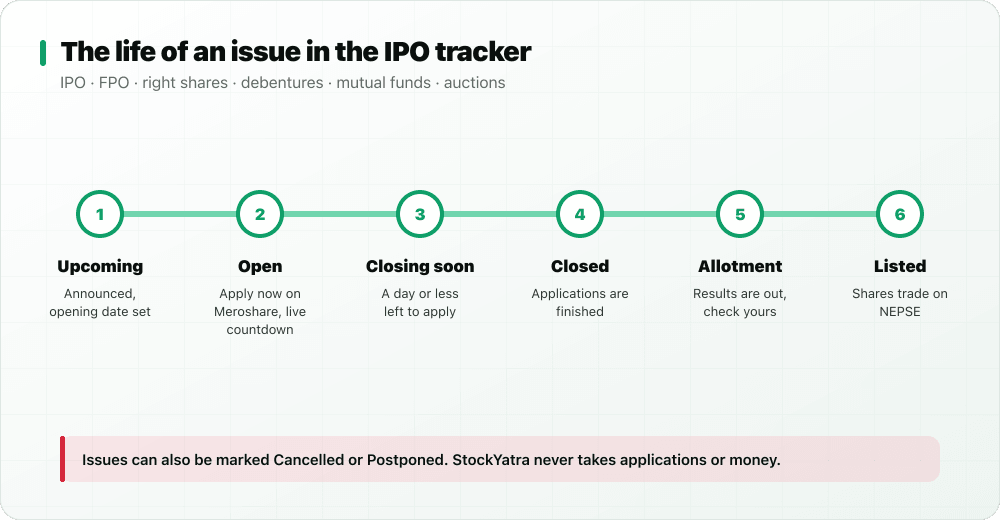
Statuses are worked out from the issue's dates. Upcoming means announced but not yet open. Open means you can apply now, with a live countdown to the closing time. Closing soon means a day or less is left. Closed means applications are finished; allotment means results are out; listed means the shares now trade on NEPSE. Issues can also be marked cancelled or postponed. Open issues appear first, then upcoming ones, then finished ones.
What you need before you apply
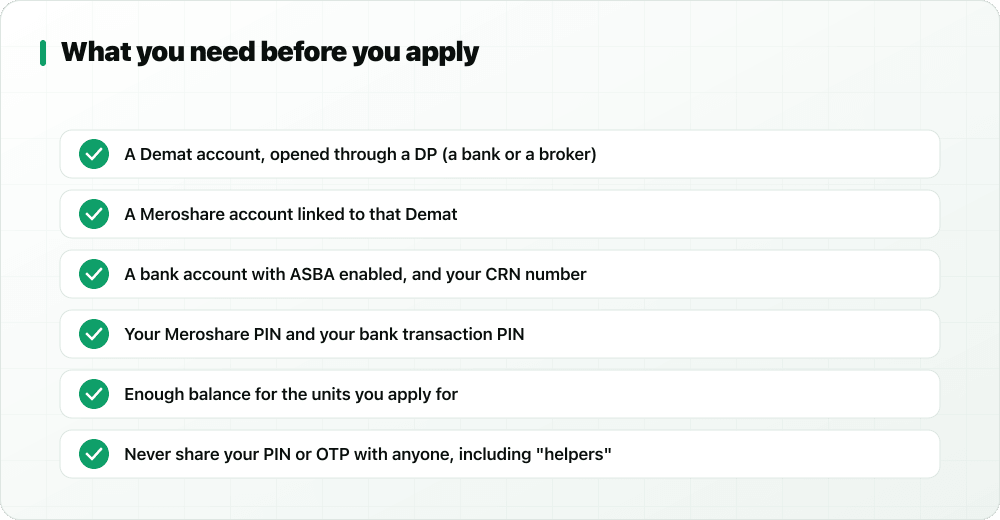
- A Demat account, opened through a depository participant (a bank or broker). See what a Demat account is.
- A Meroshare account linked to that Demat.
- A bank account with ASBA enabled, and your CRN (customer reference number) from that bank.
- Your Meroshare PIN and transaction PIN.
- Enough balance in the linked account for the units you apply for. The amount is blocked, not taken, until allotment.
How to apply for an IPO on Meroshare, step by step
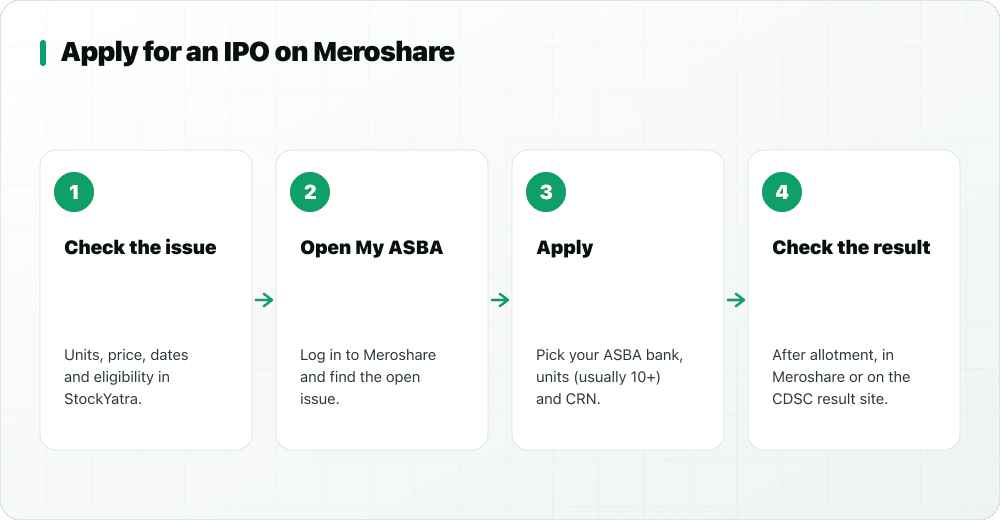
- Check the issue in StockYatra. Confirm it is open, that you are eligible, the price per unit and the minimum units. Tap Open Meroshare on the issue page.
- Log in to Meroshare during the open window and go to My ASBA. The issue is listed under current applications.
- Choose the company, then select your ASBA bank and account.
- Enter the number of units (usually at least 10) and your CRN, and accept the declaration.
- Enter your transaction PIN and submit. Meroshare shows the application in your report.
- After the allotment date, check the result in Meroshare or on the CDSC IPO result site (iporesult.cdsc.com.np).
- If allotted, the shares appear in your Demat and you can sell them after listing. If not, the blocked amount is released.
Common mistakes to avoid
- Applying after the closing time. Check the countdown and the extended close date if there is one.
- Entering the wrong CRN or an account without enough balance, which gets the application rejected.
- Applying under a quota you are not eligible for, such as the locals or foreign-employment quota.
- Sharing your PIN or OTP with anyone who offers to "apply for you". No legitimate helper needs it. Read how to spot stock-tip scams.
- Paying anyone who promises guaranteed allotment. Allotment follows the official process, often a lottery when an issue is oversubscribed.
Learn before you apply
An IPO is still an investment in a real company with real risk. Read the prospectus, understand the sector, and learn the basics first. StockYatra's Academy has courses on IPOs, FPOs, right shares, Demat and Meroshare and C-ASBA, with videos in Nepali, English and Hindi (see the course), and our IPO investing guide covers allotment and listing in depth. You can also look at real market prices in StockYatra's view-only NEPSE Live Data section, and practise trading skills with virtual coins on the simulator.
A note on accuracy
The StockYatra team maintains the IPO catalogue by hand from public information. Always confirm dates, eligibility and units on Meroshare and the official notice before you apply. Nothing in the tracker is a recommendation to apply for, buy or sell any security.
More in this series
- Why StockYatra aims to be the world's best paper trading app
- Best paper trading app in the world: 15 things to look for
- What global paper trading apps miss
- Our vision: built in Nepal, for the world
- Learn the stock market in the Watch feed
- A stock market course in Nepali, English and Hindi
- Weekly leagues, streaks and the daily Bull-or-Bear call
- Yatra Bazaar: trader cosmetics you earn
- StockYatra September 2026 update
Key takeaways
- StockYatra's IPO tracker lists IPOs, FPOs, right shares, debentures, mutual funds and auctions with status, dates and details.
- You need a Demat, Meroshare, an ASBA bank account with CRN, and your PINs.
- Apply in Meroshare under My ASBA: company, bank, units, CRN, PIN, submit. Check results after allotment.
- StockYatra never takes applications or money, and never gives buy or sell advice.
Learn IPOs and practise free
Download StockYatra on iPhone or Android, start with 10,000 free virtual coins, and practise live-simulated Nepal, India and Forex markets while you learn. No real money is ever at risk.