In short
- You can test a trading idea in about 30 lines of Python with pandas.
- The key step is shifting the signal, so you only trade on information you already had.
- Always include fees and compare with buy and hold.
- Our example lost money in testing. That is a useful, honest result.
Writing a backtest yourself is the fastest way to understand what quant traders and algo traders actually do. You do not need a framework. A CSV of prices and the pandas library are enough to test a simple idea and, more importantly, to see why most ideas fail.
What you need
- Python 3 and pandas (
pip install pandas). - A CSV of candles with columns
time, open, high, low, close, volume, wheretimeis a Unix timestamp in seconds. You can export one from most charting tools or brokers. If your file uses dates instead, change theto_datetimeline.
The code
import pandas as pd

FAST, SLOW, FEE = 20, 50, 0.001          # moving-average lengths, 0.1% fee per trade

df = pd.read_csv("AAPL.csv")             # columns: time, open, high, low, close, volume
df["date"] = pd.to_datetime(df["time"], unit="s")
df = df.set_index("date").sort_index()

df["fast"] = df["close"].rolling(FAST).mean()
df["slow"] = df["close"].rolling(SLOW).mean()

# 1 = hold the stock, 0 = stay in cash
df["signal"] = (df["fast"] > df["slow"]).astype(int)

# trade on the NEXT bar: today's signal can only use today's close
df["position"] = df["signal"].shift(1).fillna(0)

df["ret"] = df["close"].pct_change().fillna(0)
trades = df["position"].diff().abs().fillna(0)
df["strategy"] = df["position"] * df["ret"] - trades * FEE

equity = (1 + df["strategy"]).cumprod()
buy_hold = (1 + df["ret"]).cumprod()
drawdown = equity / equity.cummax() - 1

print(f"Bars tested:     {len(df)}")
print(f"Trades:          {int(trades.sum())}")
print(f"Strategy return: {equity.iloc[-1] - 1:+.1%}")
print(f"Buy and hold:    {buy_hold.iloc[-1] - 1:+.1%}")
print(f"Max drawdown:    {drawdown.min():.1%}")
Line by line
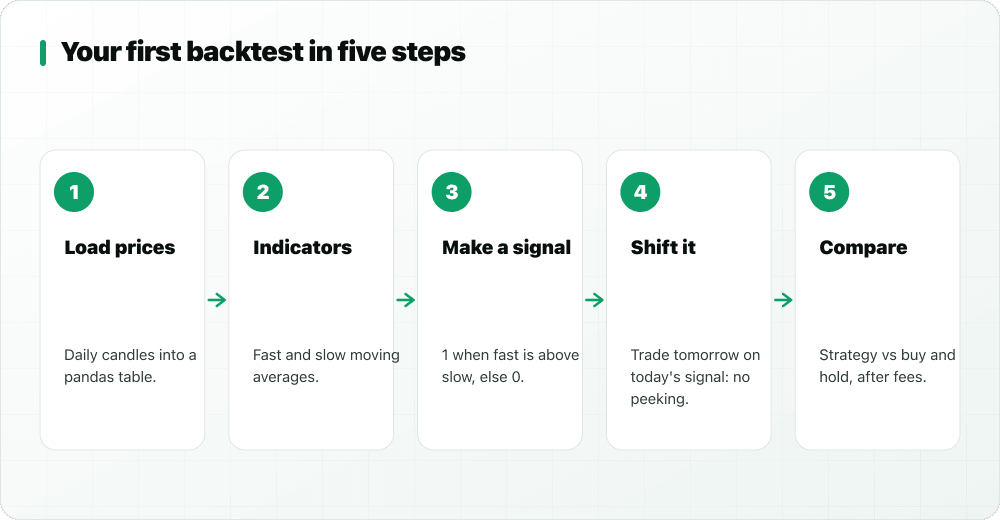
- Settings: a 20-bar and a 50-bar simple moving average, and a 0.1% cost each time the position changes.
- Load and sort the prices by time.
- Indicators:
rolling(n).mean()is a simple moving average. - Signal: 1 when the fast average is above the slow one, otherwise 0 (in cash).
- Shift:
shift(1)means we act on the next bar. Without it, the backtest uses today's close to trade at today's close, which is look-ahead bias and makes almost anything look good. - Returns: the strategy earns the stock's return only while holding, minus fees whenever it buys or sells.
- Results: final return, buy and hold, and maximum drawdown (the deepest fall from a peak).
Our result, honestly
We ran this exact code on 500 hourly AAPL candles from StockYatra's practice market:
Bars tested:     500
Trades:          24
Strategy return: -12.5%
Buy and hold:    +0.4%
Max drawdown:    -12.6%
The crossover lost money and did worse than simply holding. In a sideways, choppy market, moving-average crossovers flip in and out often, and the fees and late entries add up. Your numbers will differ with other data. The point is the process: a precise rule, no look-ahead, costs included, and an honest comparison.
Next steps to try
- Change
FASTandSLOW, but beware: trying many settings and keeping the best one is overfitting. Test the winner on data you did not use. - Add a filter, for example only take signals when the 200-bar average is rising.
- Count winning and losing trades, and the average win versus average loss.
- Try the same rule on a different stock or market.
No Python? Test it on the chart
StockYatra does not offer a public trading API, but you can test the same logic without code. The no-code builder in Pro Chart can do "SMA 20 crosses above SMA 50", and Pro Chart also runs Pine Script like this:
//@version=5
strategy("SMA 20/50 cross", overlay=true)
fast = ta.sma(close, 20)
slow = ta.sma(close, 50)
plot(fast, "SMA 20", color=color.green)
plot(slow, "SMA 50", color=color.red)
if ta.crossover(fast, slow)
    strategy.entry("Long", strategy.long)
if ta.crossunder(fast, slow)
    strategy.close("Long")
Every buy and sell is drawn on the NEPSE, NSE or US practice chart, with return, win rate, profit factor and drawdown. It is a quick way to sanity-check an idea before or after coding it.
Key takeaways
- pandas can backtest a simple rule in about 30 lines.
- Shift signals by one bar to avoid look-ahead bias.
- Include fees and compare with buy and hold.
- An idea that fails a fair test is a lesson, not a failure.
Test rules on the chart, no code needed
StockYatra is a free practice app for Nepal (NEPSE), India (NSE) and US stocks. Write rules, test 41 transparent strategies or your own Pine Script in Pro Chart, backtest them on the chart, and practise with virtual coins. Nothing is real money.
More on algos, HFT and quant
- What is high-frequency trading?
- HFT vs algo vs manual trading
- Market making and the bid-ask spread
- What caused the 2010 Flash Crash?
- The NSE co-location case, explained
- Jane Street vs SEBI: the case explained
- Quant trading explained for beginners
- How trading bots and automation work
- Algo trading: the one-page guide
- HFT: the one-page guide
- Black box AI trading, explained
StockYatra is an education app, not a broker, adviser or research analyst. Nothing here is a recommendation to buy or sell any security or to use any trading product. Case summaries are based on public orders and press reports; allegations are not findings, and outcomes can change on appeal. Practice prices are simulated and coins are virtual.