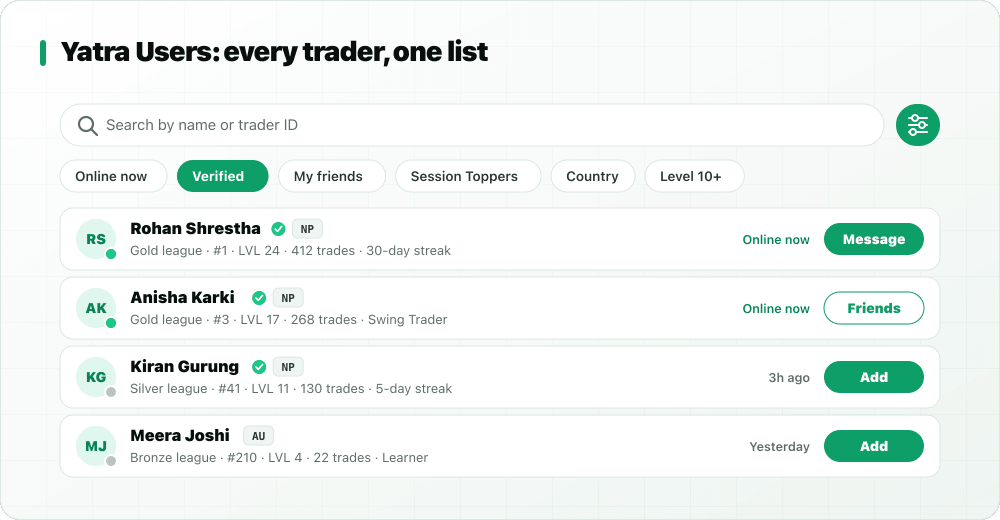
A community only helps if you can find the right people in it. That is what Yatra Users does. It is a directory of every trader on StockYatra, with enough detail on each row to tell at a glance who is at your level, who trades the way you do, and who is online right now to chat.
In short
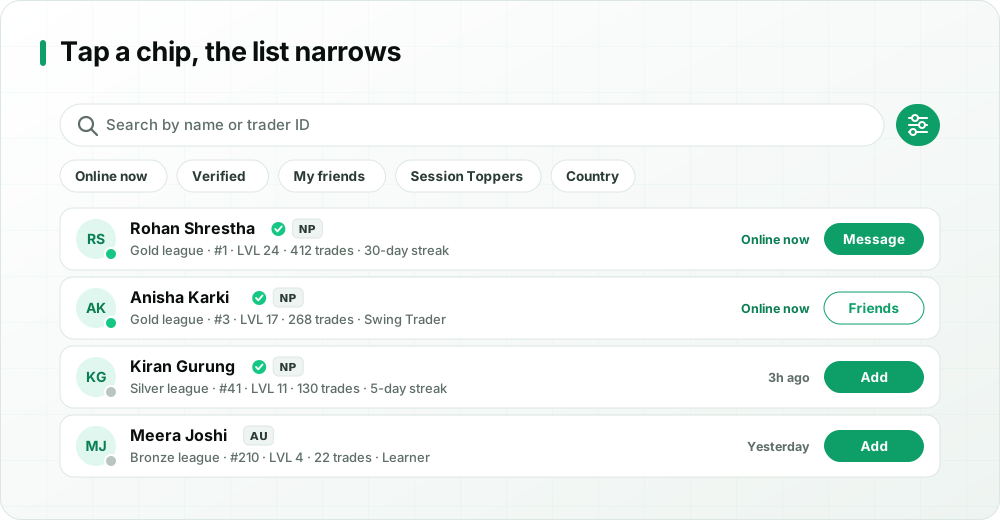
- Yatra Users lists every StockYatra trader: flag, verified tick, league and rank, level, trades, achievements, learning streak and last active.
- Search by name or trader ID; filter by online now, verified, my friends, Session Toppers, country, minimum level and trading style.
- Sort by most active, rank, level, name or newest.
- Add, accept or message people straight from the list.
What is Yatra Users?
Think of it as the phone book of the StockYatra community, with useful context on every entry. You can open it from the online-traders pill at the top of the chat screen. Instead of hoping the right person happens to post in Global at the right moment, you can go looking for them: a trader at your level, someone who shares your style, or a newcomer who could use a friendly hello. It is part of the wider community update that also brought Global chat, friends and direct messages.
What each row tells you
Every trader row packs in the signals that matter when you are looking for a study partner or someone to learn from:
| Signal | What it tells you |
|---|---|
| Country flag | Where the trader is from, handy for finding people in your time zone. |
| Verified tick | The trader has verified an email or phone and can chat. |
| League and rank | Their position on the simulator leaderboard. |
| Level | How far along the learning path they are. |
| Trade count | How much practice they have put in. |
| Achievements | Milestones they have unlocked while learning. |
| Learning streak | How consistently they show up, often the best predictor of progress. |
| Last active | Online now, or when they were last in the app. |
Search by name or trader ID
Know who you are looking for? Type their name or their trader ID into the search bar. Trader IDs are handy when a friend shares their StockYatra profile or you want to find someone you met in Global chat without scrolling.
Filters that find your people
Tap the quick chips for common filters, or open the options sheet for the full set:
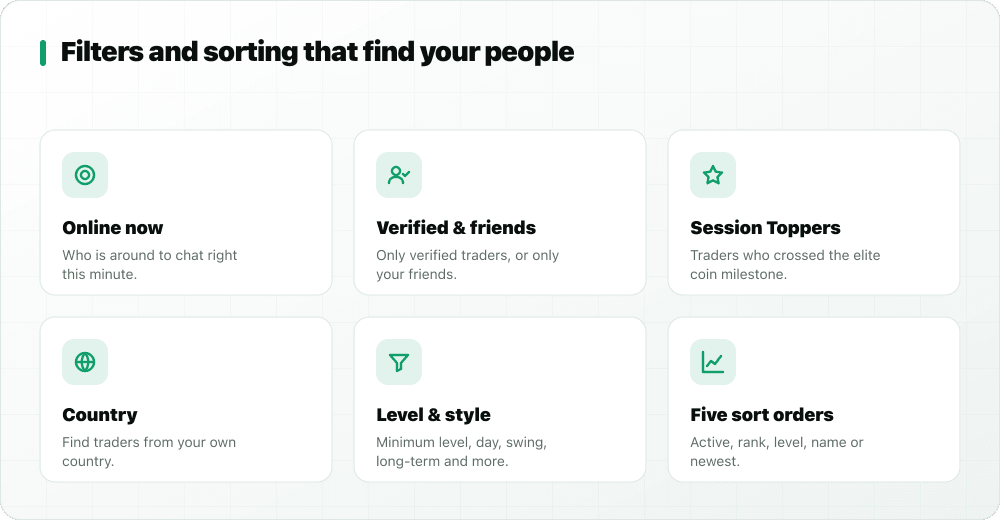
Online now
Shows only traders who are in the app at this moment. Best for when you want a quick second opinion on something you are studying.
Verified
Limits the list to verified traders, the people who can post, add friends and send messages.
My friends
Filters down to your existing friends, useful once your circle grows.
Session Toppers
Shows traders who have earned the Session Topper badge, StockYatra's elite marker for reaching a very large virtual coin milestone. Worth following to see how experienced learners think, but remember their results come from practice with virtual coins.
Country
Find traders from a particular country. Most StockYatra traders are in Nepal, and the filter also helps Nepalis abroad find each other.
Minimum level and trading style
Set a minimum level to find traders at or beyond a point in the learning path, and filter by trading style: day trader, swing trader, position trader, scalper, long-term investor or learner. Not sure which describes you? Read intraday vs swing trading.
Five ways to sort
- Active: most recently active first. The default, and the best way to find people who will reply.
- Rank: leaderboard position, highest first.
- Level: furthest along the learning path first.
- Name: alphabetical.
- Newest: traders who joined most recently. Great for welcoming beginners.
Add, accept or message from the list
Each row has an action button that matches your relationship with that trader: Add to send a friend request, Accept if they have already sent you one, or Message if you are already friends. Messages are friends-only, which keeps inboxes free of unwanted contact. More on that in friends and direct messages.
Reading the signals wisely
Every number on a row tells you something, but none tells you everything. A few rules of thumb:
- League and rank reflect results on virtual coins. Leagues step up from Bronze through Silver, Gold and Platinum to Diamond as a trader's virtual net worth grows. A high rank can come from skill, from a lucky run with big positions, or both.
- Trade count shows practice volume. Hundreds of trades mean lots of experience with order tickets and exits, but not necessarily good habits.
- Learning streak shows consistency. Someone who shows up every day for a month is usually a better study partner than someone who traded heavily for one week.
- Level shows progress through StockYatra's learning path. It is a good proxy for how much of the theory they have covered.
- Achievements hint at what they have practised. They are good conversation starters: "how did you unlock that one?"
Put together, these signals help you find people who match what you need right now: someone to practise with, someone to learn from, or someone to help.
Recipes: how to use Yatra Users well
Find a study partner at your level
Filter verified + online now, set a minimum level close to yours, and sort by active. Look for a steady learning streak. Send two or three friend requests with a short hello explaining what you are working on.
Learn a style that is different from yours
If you are a swing trader, filter for day traders or long-term investors and ask how they think about entries and exits. Different styles expose different blind spots.
Welcome a beginner
Sort by newest. Remembering how confusing your first week was, a friendly welcome and a link to our NEPSE beginner's guide can make a real difference.
Study how top learners think
Filter Session Toppers or sort by rank, then read how those traders explain their reasoning in Global chat. Look for process, not predictions.
Writing a first message that gets a reply
A friend request with context is far more likely to be accepted. Once someone accepts, open with something specific and easy to answer:
- "Hi! I saw we're both swing traders around level 10. Want to swap one trade review a week?"
- "Your explanation of support levels in Global really helped. How do you decide when a level has broken?"
- "Welcome to StockYatra! If you're new, the guided tours and the journal habit helped me most. Happy to answer questions."
Keep it about learning. Asking someone what they are buying, or offering "calls" of your own, breaks the community guidelines and misses the point of the directory.
Respect and privacy
The directory shows learning signals, not personal details. Keep it that way: do not ask traders for phone numbers or broker logins, do not spam friend requests, and report anyone who uses the directory to push tip groups. StockYatra is a practice platform with virtual coins; nobody should ever ask you for real money.
Key takeaways
- Yatra Users is a directory of every StockYatra trader, reachable from the chat screen.
- Rows show flag, verified tick, league and rank, level, trades, achievements, streak and last active.
- Search by name or trader ID, filter by online, verified, friends, Session Toppers, country, level and style, and sort five ways.
- Add, accept or message people directly from the list.
Find traders like you, free
Download StockYatra on iPhone or Android, start with 10,000 free virtual coins, and practise live-simulated NEPSE-style markets alongside other learners. No real money is ever at risk.