Every good student has a study partner: someone who asks "why did you do that?" at exactly the right moment. Trading is no different. StockYatra now lets you add friends and message them privately, so the person who keeps you honest about your stop-losses is always one tap away.
In short
- Send friend requests; the other person accepts or declines, and you can cancel a request any time.
- Your friends list shows each friend's leaderboard rank (a lion for #1), level, online status and your last message.
- Direct messages only work between current friends. Remove a friend and the DM closes.
- Swipe right to reply with a quote, tap a quote to jump to the original, and see when a friend is typing.
Why a study partner makes you a better trader
When you practise alone, it is easy to explain away a bad trade: "the market was weird today". When you have to describe that trade to a friend who asks follow-up questions, the excuses fall apart and the real lesson appears. A partner also notices patterns you cannot see in yourself, like always entering too early or moving your stop when a trade goes against you. We explore the psychology behind this in why learning with a community makes you a better trader.
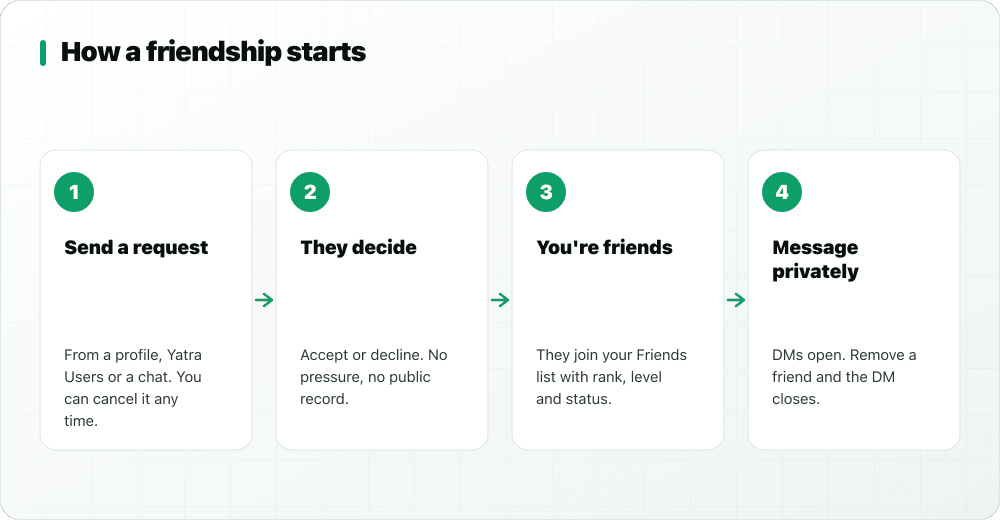
How friend requests work
Sending a request
You can send a friend request from a trader's profile, from the Yatra Users directory, or from someone you have been talking to in Global chat. Changed your mind? You can cancel a request you sent before it is answered.
Accepting or declining
When someone sends you a request, you get a notification and can accept or decline. There is no pressure and no public record of a decline. If you accept, the other person is notified and you both appear in each other's friends list.
Removing a friend
You can remove a friend at any time. When you do, your direct message conversation closes too: the chat shows that you are no longer friends and the message box is replaced with a notice.
Your friends list at a glance
The Friends tab is more than a list of names. Each friend shows:
- Leaderboard rank, with a lion for whoever is #1 and a podium chip for the top three.
- Level, so you can see who is further along the learning path.
- Online status, a live dot when they are in the app right now.
- Your last message, with "You:" when you sent it, and the time.
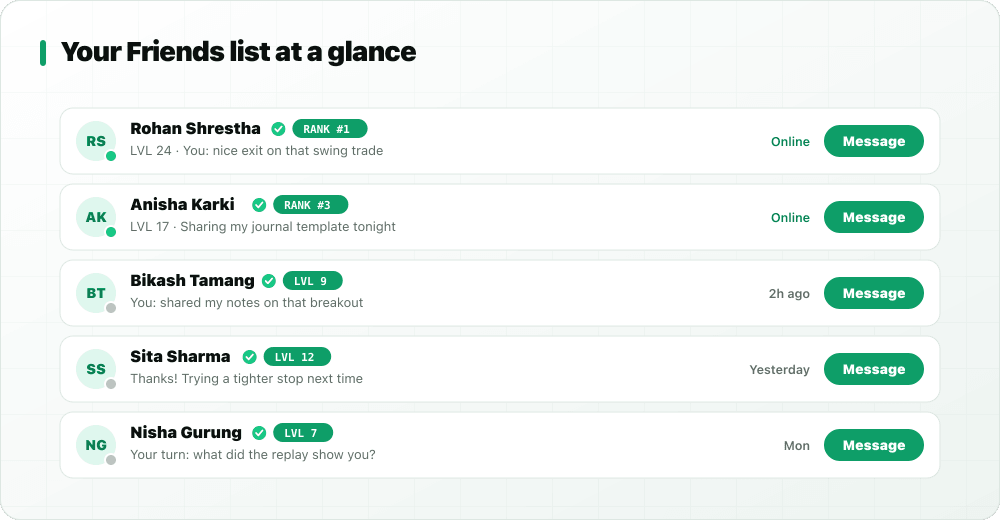
That combination helps you pick the right person for the right question: an online friend for a quick check, a higher-level friend for a harder one.
Direct messages: private, and only between friends
Direct messages (DMs) are private one-to-one conversations. The key rule is simple: you can only message someone who is currently your friend.
Why friends-only?
Open inboxes are where scams and harassment thrive, because anyone can message anyone. Tying DMs to an accepted friendship puts you in control of who can reach you privately. Guests need to verify their email or phone before they can add friends or send DMs, which keeps throwaway accounts out too.
Swipe right to reply
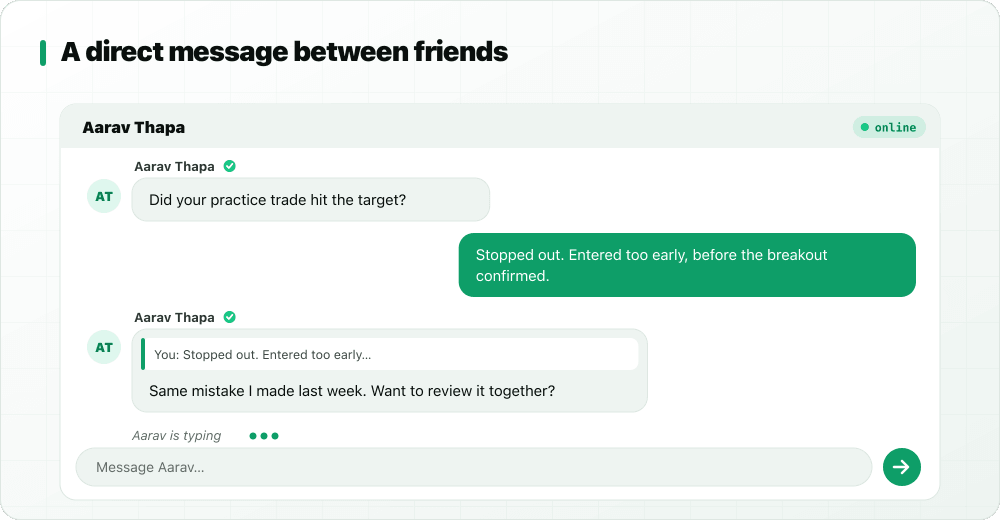
When a conversation has a few threads going at once, a plain reply can be ambiguous. Swipe any message to the right and your reply quotes it. The quote sits on top of your message so your friend knows exactly what you are answering. Later, tap the quote to jump back to the original message, even if it is far up the conversation.
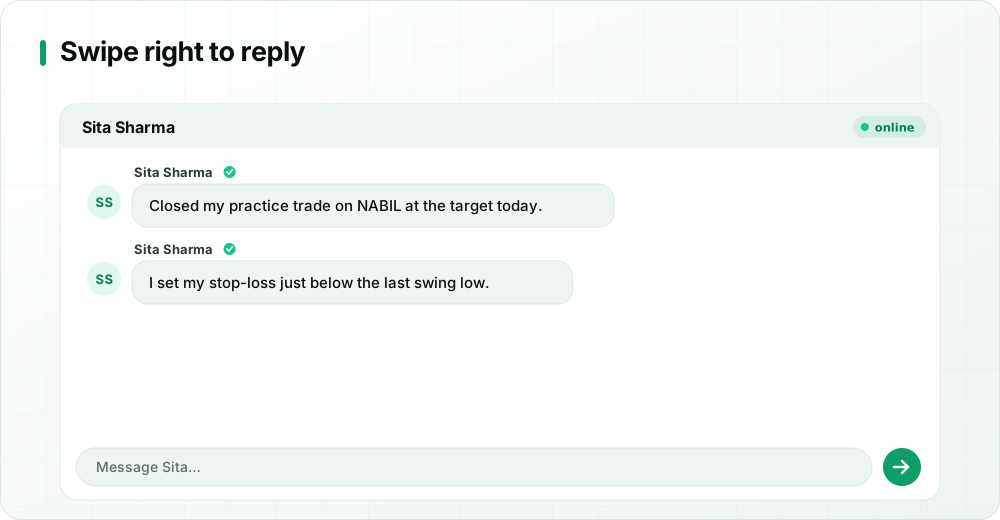
Swipe-to-reply works in Global chat as well as in DMs. It is especially handy in a trade review, where you might be discussing the entry, the stop and the exit at the same time: quote the exact message you are answering and nobody has to guess which point you mean.
Typing indicators and sounds
When your friend is writing back, you see a live typing indicator at the bottom of the chat. Subtle sounds mark messages arriving and sending. Together they make a conversation feel live, which matters more than it sounds: you are far more likely to finish a trade review when you can tell the other person is right there with you.
Friend notifications that do not nag
You get a notification when someone sends you a friend request, when a request you sent is accepted, and when a friend messages you. They land in your notifications inbox too, so nothing gets lost if you swipe a push away. If you already have that conversation open, you will not get a duplicate push for every new message: the chat is right in front of you.
How to choose a good study partner
The best partner is not necessarily the highest-ranked trader. Look for someone who will actually show up and think with you:
- A steady learning streak. Consistency matters more than one big month.
- A similar or slightly higher level. Close enough to relate to your mistakes, far enough along to spot them.
- A compatible schedule. The online status and "last active" time show when someone tends to be around.
- Good answers in Global. People who explain their reasoning clearly in public usually make great partners in private.
- A different style, sometimes. A swing trader and a long-term investor can challenge each other's assumptions in useful ways.
When you send a request, follow it with a short first message once they accept: "Hi, I'm working on stop-loss placement and trying to review one trade a week. Want to swap reviews?" A clear, low-effort ask gets a yes far more often than a vague "hello".
Study-partner routines that actually work
Friends and DMs are tools; habits make them useful. Here are routines StockYatra learners can try:
- The weekly two-trade review. Each of you picks one winning and one losing practice trade from the week and explains the entry, the exit and what you would change.
- Plan before you trade. Message your partner your plan before entering: entry, stop-loss, target, size. Afterwards, compare what happened with the plan.
- One concept a week. Pick a topic, such as support and resistance, and each find one example on the charts to discuss.
- Journal swap. Share a page of your trading journal and ask for one honest observation.
- Rule check. Agree on two risk rules and remind each other when one gets broken.
None of these involve telling each other what to buy. The goal is to sharpen each other's reasoning, not to copy trades.
Staying safe in private chats
- Never share passwords, OTPs, PINs, broker (TMS) or Meroshare logins, even with friends.
- If a friend starts pushing paid tip groups or "guaranteed" returns, remove them and report the messages.
- Keep conversations about learning. StockYatra uses virtual coins only; nobody should ask you to send real money.
Key takeaways
- Friend requests can be sent, accepted, declined or cancelled; removing a friend closes the DM.
- The friends list shows rank (lion for #1), level, online status and your last message.
- DMs are friends-only and need a verified account, which keeps unwanted messages out.
- Swipe right to reply with a quote, tap to jump to the original, and watch for the typing indicator.
Find your study partner, free
Download StockYatra on iPhone or Android, start with 10,000 free virtual coins, and practise live-simulated NEPSE-style markets alongside other learners. No real money is ever at risk.