If you have ever joined a share market group on social media, you know how it usually goes: a flood of "buy now" messages, screenshots of profits nobody can check, and questions from beginners that get ignored. StockYatra's Global chat is built to be the opposite. It is one shared room where Nepali learners ask questions, explain their reasoning and learn in public, with the safety rules built into the system rather than left to hope.
In short
- Global chat is one shared room for the whole StockYatra community, inside the app.
- Anyone can read; only verified traders (email or phone) can post. Guests get a one-tap verify prompt.
- Rules: be respectful, no buy/sell tips or "sure-shot" calls, no spam, keep personal details private.
- Abuse is masked automatically, only StockYatra-family links are tappable, and moderators can remove, mute or ban.
Why learn in public?
When you ask a question in a room full of learners, three good things happen. You get an answer faster than searching alone. Other people who were too shy to ask learn from your question. And the act of writing the question clearly often answers half of it. That is why "learning in public" is such a powerful habit, and why we put Global chat at the centre of the StockYatra community update.
Global works best for questions like these:
- "What is the difference between a limit order and a market order when the price moves fast?"
- "My stop-loss triggered and then the price went back up. Was my stop too tight, or is that normal?"
- "How are you all keeping a trading journal? What columns do you track?"
- "What does NEPSE's circuit breaker actually do during a big move?"
Notice what is missing: "Which share should I buy?" That is not a question the community answers, and the next sections explain why.
Who can post: verified traders only
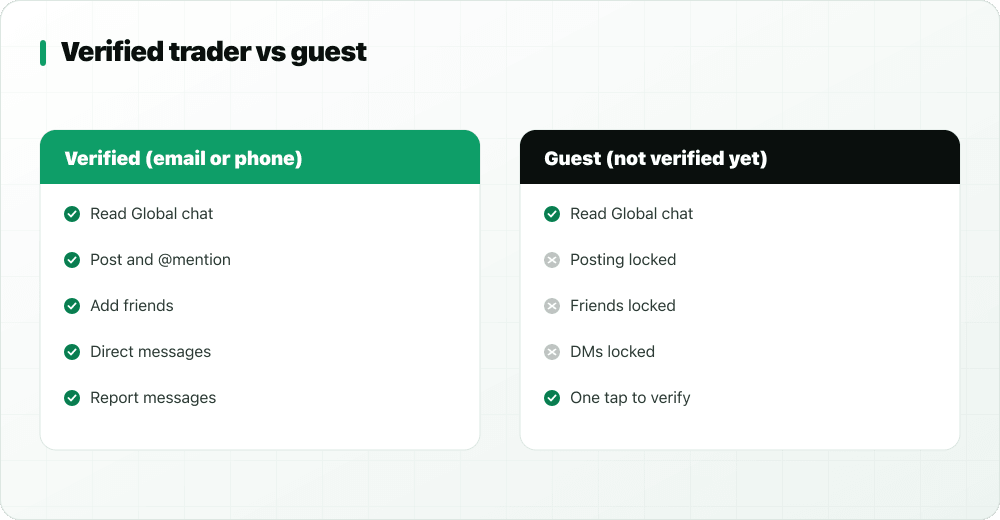
Global chat is open to read for everyone using the app. Posting, along with friends and direct messages, needs a verified account. You verify once, with your email or phone, and you are in.
Why verification matters
Most spam and abuse in open chat rooms comes from throwaway accounts that cost nothing to create and nothing to lose. Requiring a verified email or phone raises that cost just enough to keep the room made of real learners, while staying free and quick for everyone who wants to take part.
Guests are welcome to read
If you are not verified yet, you still see the whole conversation. Where the message box would be, you get a friendly prompt that takes you to verification in one tap. Lurking is a perfectly good way to start: plenty of people read for a week before asking their first question.
The Global chat guidelines
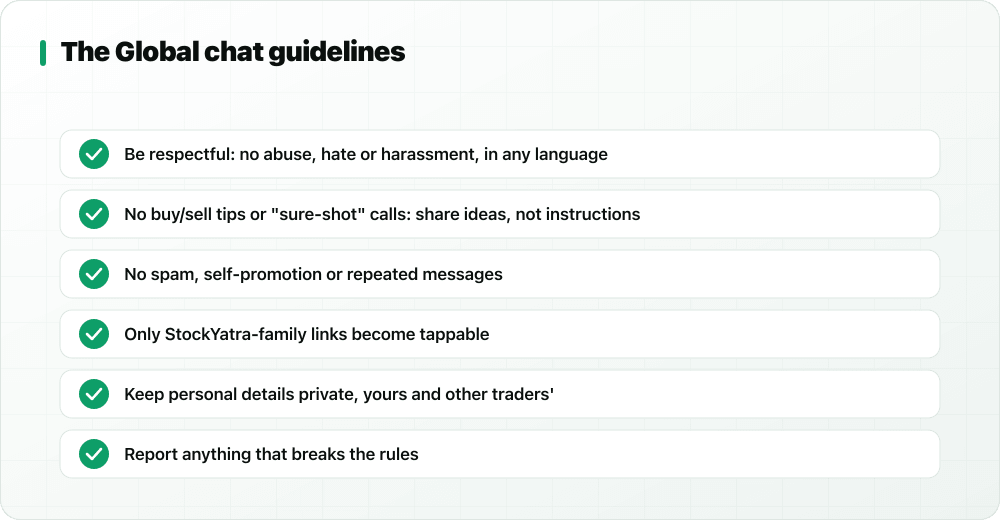
The rules are short enough to read in thirty seconds, and they are shown right inside the chat so nobody can say they missed them.
1. Be respectful, in any language
No abuse, hate, harassment or threats, whether you write in English, Nepali or Romanised Nepali. Disagreeing about a chart is healthy; attacking the person who drew it is not.
2. No buy/sell tips or "sure-shot" calls
This is the rule that makes Global different. Members share ideas and reasoning, never instructions like "buy X before 11 am". Tips skip the learning, invite copy-trading, and are the raw material of pump-and-dump schemes. StockYatra is an education platform that never gives investment advice, and the chat follows the same principle. See how stock-tip scams work for the full story.
3. No spam or self-promotion
No repeated messages, no advertising, no "join my channel". Anti-spam limits also slow down anyone posting too fast.
4. Only StockYatra-family links become tappable
Links to StockYatra's own sites, such as this blog or the web trade terminal, become tappable. Every other link stays plain text. That single design choice removes the most common scam in chat groups: a friendly message with a link to a fake app, a paid tip group or a phishing page.
5. Keep personal details private
Never post your phone number, broker login, Meroshare details or anyone else's personal information. Nobody legitimate will ever ask for your password or OTP in a chat.
6. Report anything that breaks the rules
Every message has a report option. Reports go to StockYatra's moderators, who review them.
What happens when you press send
The rules are not just words on a screen. Every message goes through the same checks on StockYatra's servers before anyone else sees it:
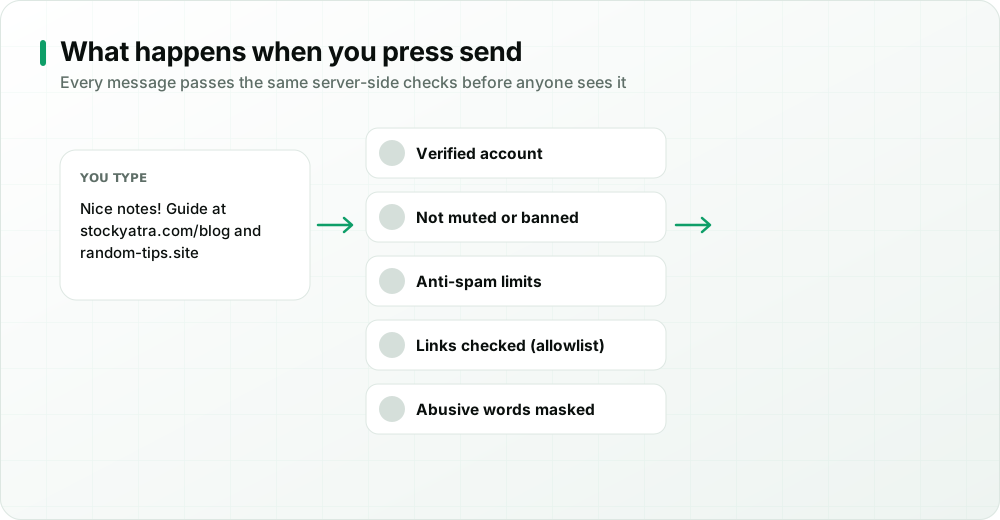
- Verified account: unverified accounts cannot post.
- Not muted or banned: members restricted by moderators cannot post until the restriction ends.
- Anti-spam limits: rapid-fire posting is slowed down.
- Links checked: only StockYatra-family links become tappable.
- Abusive words masked: offensive words are automatically replaced with asterisks.
Reporting and moderation
Automatic checks catch a lot, but people catch the rest. When you report a message, moderators can remove it, mute the sender for a period, or ban them from chat entirely for serious or repeated breaks. Moderation is there to protect the learning, not to police opinions: disagreeing about whether a trend is ending is fine; abuse, spam and tip-pushing are not.
Good messages vs messages that break the rules
| Welcome in Global | Not allowed |
|---|---|
| "I set my stop below the swing low. Is that too tight for a volatile share?" | "Buy this share now, target 40% by Friday!" |
| "Here is how I size positions so one loss is never more than 2% of my coins." | "Join my VIP group for daily sure-shot calls." |
| "My journal shows I overtrade after a loss. Anyone else?" | Insults, threats or abusive language |
| "This blog post on support and resistance helped me: [StockYatra link]" | Links to outside tip groups or unknown apps |
Asking your first question: a simple template
Plenty of learners read Global for days before posting because they worry their question is too basic. It almost never is. Somebody else is wondering the same thing. A clear question gets better answers, so try this shape:
- Context: what you were doing. "I'm practising swing trades on the simulator with small positions."
- What happened: the specific thing. "My stop-loss triggered, then the price recovered the same afternoon."
- What you think: your current guess. "I think my stop was too close to the entry."
- The question: one clear ask. "How do you decide how much room to give a stop on a volatile share?"
Questions shaped like this get thoughtful replies, because they show you have already thought about it. They also make great journal entries once you have an answer.
What Global chat is not
Global is not a signal service, a news wire or a place to promote anything. It is also not a replacement for doing your own work: the community can point out what you missed, but the learning only sticks when you go back to the chart and test the idea yourself on the simulator. And because every trade on StockYatra uses virtual coins, nothing anyone says in Global can cost you real money, which is exactly what makes it a safe place to be wrong in public.
How to get the most out of Global chat
- Share your reasoning, not just your result. "I was up 8%" teaches nobody anything; "I entered on the retest and exited at my target" does.
- Ask specific questions. Include what you tried and what confused you.
- Use @mentions when you want a specific person's view. They get a notification.
- Swipe right to reply so your answer quotes the message you are answering.
- Move deep dives to DMs. Add the person as a friend and review the trade together. See friends and direct messages.
- Bring lessons back. If a conversation taught you something, write it in your trading journal.
Key takeaways
- Global chat is a shared, moderated room for StockYatra learners in the app.
- Read freely; post after a one-time email or phone verification.
- No tips, no abuse, no spam: enforced by automatic checks, reports and moderators.
- Only StockYatra-family links are tappable, which shuts the door on most link scams.
Join Global chat, free
Download StockYatra on iPhone or Android, start with 10,000 free virtual coins, and practise live-simulated NEPSE-style markets alongside other learners. No real money is ever at risk.